- Key Features at a Glance
- Design and Build Quality | PlayStation Portal Review
- Performance and Display
- Connectivity: Is It Seamless?
- Battery Life: How Long Can You Play?
- Pros and Cons of the PlayStation Portal
- Should You Buy the PlayStation Portal?
- Final Verdict: PlayStation Portal Review
- PlayStation Portal Review – FAQs
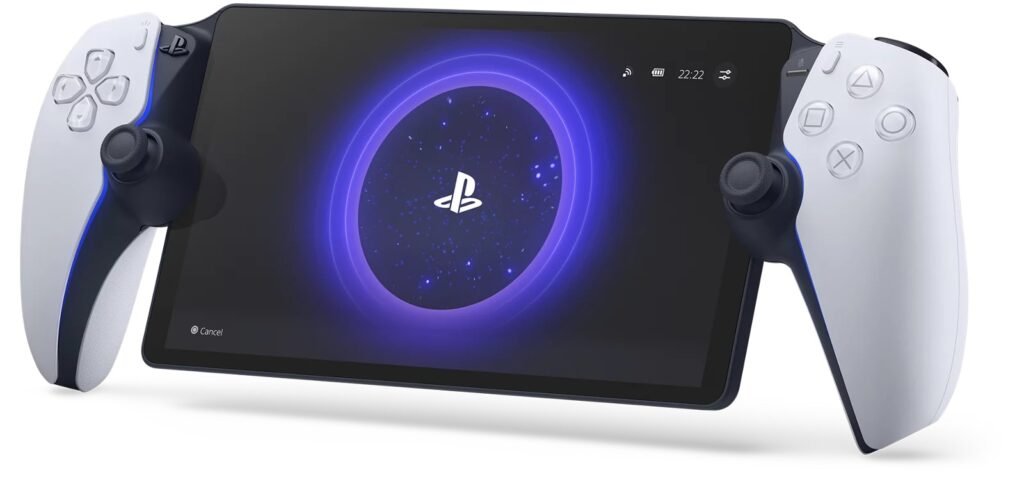
The PlayStation Portal Review shows that Sony’s handheld is a dedicated Remote Play device for PS5 owners. It streams games directly from the console, offering a sharp 8-inch display and full DualSense controller features. Unlike the Nintendo Switch or Steam Deck, it cannot run games natively and relies on a stable Wi-Fi 5 connection. This makes the PlayStation Portal best suited for gamers who want a portable, easy-to-use companion for their PlayStation 5, but not a standalone gaming system.
Let’s dive in and see if the PlayStation Portal truly lives up to the hype!
Key Features at a Glance
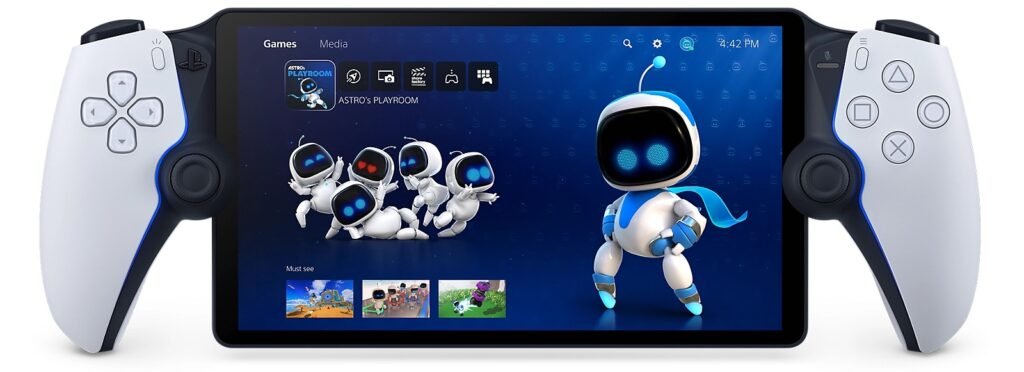
- 8-inch LCD Display with 1080p resolution for crystal-clear visuals.
- Adaptive Triggers and Haptic Feedback for PS5-level immersion.
- Remote Play Exclusive: Requires a stable Wi-Fi connection and PS5.
- Lightweight Design: Sleek and portable for gaming on the move.
Design and Build Quality | PlayStation Portal Review
Sony has nailed the design for the PlayStation Portal. Featuring an 8-inch LCD screen neatly placed between two DualSense-inspired controllers, the device feels familiar and premium. The ergonomic layout ensures that long gaming sessions are comfortable, whether you’re lying on the couch or traveling.
- Weight: At just over 500 grams, it strikes the right balance between portability and durability.
- Buttons and Controls: It retains the full DualSense functionality, including adaptive triggers and haptic feedback, which elevate your gameplay experience.
The PlayStation Portal is sleek and functional, making it a perfect companion for PS5 owners who want to untether themselves from the living room.
Performance and Display
The 8-inch 1080p LCD screen delivers sharp visuals, ensuring your PS5 games look crisp and vibrant. While OLED enthusiasts may notice the lack of deeper blacks and contrast, the display performs admirably for its price range.
- Resolution: 1080p at 60fps for a smooth experience.
- Colors and Brightness: Bright and vivid enough for indoor use but struggles slightly under direct sunlight.
The device relies on Sony’s Remote Play technology to stream your PS5 games. When connected to a stable Wi-Fi network, the latency is minimal, and gameplay feels responsive.
Pro Tip: For the best experience, ensure a Wi-Fi speed of at least 15 Mbps.
Connectivity: Is It Seamless?
One of the standout points in this PlayStation Portal Review is its connectivity. The device exclusively supports Remote Play, meaning you must own a PS5 and have a strong Wi-Fi connection to use it. Unfortunately, there’s no Bluetooth or native app support, which limits its versatility compared to other handheld consoles.
- Wi-Fi: Dual-band Wi-Fi ensures smooth and reliable performance.
- No Bluetooth: Lack of Bluetooth for third-party headsets is disappointing.
- Audio: 3.5mm audio jack included for wired headphones.
Sony’s focus on Remote Play makes it ideal for in-home gaming rather than fully portable gaming like the Steam Deck or Nintendo Switch.
Battery Life: How Long Can You Play?
The PlayStation Portal offers around 5-7 hours of battery life depending on your usage. While it may not match the Nintendo Switch, it’s decent for a streaming device. A USB-C fast charger ensures you can top up the battery quickly.
- Charging Time: 1.5-2 hours for a full charge.
- Battery Usage: High-intensity games drain the battery faster.
Pros and Cons of the PlayStation Portal
Pros:
- Seamless Remote Play experience for PS5 games.
- Immersive haptic feedback and adaptive triggers.
- Lightweight, ergonomic design for comfort.
- Crystal-clear 1080p display.
Cons:
- No native app or Bluetooth support.
- Requires constant, stable Wi-Fi connection.
- Limited to PS5 Remote Play; cannot be used independently.
How does the PlayStation Portal compare to other handheld gaming options? Here’s a quick breakdown:
| Feature | PlayStation Portal | Steam Deck | Nintendo Switch OLED |
|---|---|---|---|
| Display | 8-inch 1080p LCD | 7-inch 1280×800 LCD | 7-inch 720p OLED |
| Game Compatibility | PS5 Remote Play Only | PC Games (Steam) | Nintendo Exclusives |
| Battery Life | 5-7 hours | 2-8 hours | 4.5-9 hours |
| Price | $199 | $399+ | $349 |
The PlayStation Portal excels in delivering a focused PS5 experience but falls short for users seeking a more versatile handheld.
Should You Buy the PlayStation Portal?
The PlayStation Portal is perfect for PS5 owners who want a high-quality remote play experience without shelling out for more expensive handheld devices. It’s not a replacement for a Nintendo Switch or Steam Deck but serves as an excellent companion for PlayStation enthusiasts.
If you have a strong Wi-Fi connection and love PS5 gaming, the PlayStation Portal is a no-brainer.
Final Verdict: PlayStation Portal Review
The PlayStation Portal review fills a niche space in the gaming market. While it’s not the most versatile handheld device, it shines in what it’s designed for: streaming PS5 games seamlessly. With its impressive display, adaptive controls, and comfortable design, it’s an excellent option for in-home gaming.
Rating: 8/10 🌟
Where to Buy | PlayStation Portal Review
You can grab the PlayStation Portal from leading retailers:
For more gadget reviews and gaming insights, check out our guides on 3MGadgets.com.
Related Articles
If you’re a PS5 owner looking to enhance your gaming experience, the PlayStation Portal review is worth considering. While it has a few drawbacks, its ability to deliver high-quality, low-latency PS5 gameplay on a handheld device makes it stand out.
What do you think about the PlayStation Portal? Let us know in the comments below!
Image Credit: Insert Sony PlayStation Portal images where applicable.
PlayStation Portal Review – FAQs
🆚 Is PS Portal better than PS5?
Nope, the PS Portal isn’t a replacement for the PS5. Think of it as an accessory rather than a console. The Sony PlayStation Portal is built to stream your games from your PlayStation 5—not play them independently. So, it’s more like a portable PlayStation 5 extension.
🤔 Should I get a PS5 or PS Portal?
If you’re choosing between the two, go for the PS5. The Portal PlayStation depends on it to function. But if you already have a PS5 and want to play in another room or on the go (with Wi-Fi), then the PS5 Portal Remote Player might just be your new favorite toy.
🕹️ Does PlayStation Portal have the same games as PS5?
Not exactly. The PlayStation Portal Remote Player doesn’t run games on its own. It simply streams them from your PS5. So, technically, yes—it plays the same games, but only because your PS5 is doing the heavy lifting in the background.
💡 Does the PS5 Pro make the PS Portal better?
It could! While the PS Portal itself doesn’t change, the upgraded hardware of a PS5 Pro could offer smoother streaming and better graphics quality. So if you’re aiming for top-tier performance, pairing the Sony PlayStation Portal Remote Player with a PS5 Pro is a smart move.
🌐 Will PS Portal work away from PS5?
Yes, but with a catch. The PS Portal can stream over the internet, so technically it can be used from anywhere. However, you’ll need a stable and fast connection on both ends.
🛑 Is PS Portal useless without PS5?
Pretty much, yeah. Without a PS5, the PlayStation Portal is just a fancy screen. It doesn’t support cloud gaming or standalone apps, so a PS5 is required.
💭 What can you do with a PlayStation Portal without a PS5? see the full PlayStation Portal Review above.
Honestly? Not much. Without pairing it to a PlayStation 5, you won’t be able to use it for gaming at all.
🔌 Does the PS Portal work if the PS5 is off?
Nope. Your PS5 needs to be on or in rest mode with remote play enabled. That’s how the PlayStation Portal Remote Player connects and streams your games.
🎯 What is the point of the PS5 Portal? PlayStation Portal Review
The goal is convenience. The PlayStation Portal lets you game in bed, in the kitchen, or even on the porch without hogging the living room TV. It’s a portable remote player not a console.
🏠 Can PS Portal be used away from home? PlayStation Portal Review
Yes, thanks to Wi-Fi streaming, you can use it remotely. Just make sure both the PS5 and Portal PS5 are connected to strong internet (around 15 Mbps or higher recommended).
⚙️ Does PlayStation Portal run smoothly? PlayStation Portal Review
For the most part, yes. If your internet’s solid, the experience is smooth. That said, occasional lag can happen, especially with weak Wi-Fi.
🧼 Can you make the PS Portal run smoother?
Definitely. Use 5GHz Wi-Fi, keep both devices close to the router, and ensure your PS5 is hardwired with Ethernet if possible.
✅ Does PlayStation Portal work well?
Yes—it delivers exactly what it’s made for: streaming your PS5 games to a handheld device. For most users, the PlayStation remote portal experience is surprisingly good.
📶 What speed is needed for PlayStation Portal?
Sony recommends at least 15 Mbps. But for the best PlayStation Portal Remote Play performance, aim for 25 Mbps+.
🆚 What’s better, PS5 or PlayStation Portal?
The PS5, hands down. The PS Portal is an add-on, not a standalone console. It’s like asking if a remote is better than a TV.
❗ Does PS Portal stutter?
It can—but usually only with weak connections. If you’re using quality Wi-Fi, the PS5 Portal Remote Player should be stutter-free.
🎮 How many FPS does PS Portal have?
The PS Portal streams at up to 60fps, depending on the quality of your connection and the game itself.
🔄 What is the point of the PlayStation Portal on PS5?
It’s all about flexibility. It’s the best way to play your PS5 games in different rooms or when your TV is in use.
🧠 What does the PS5 Portal do?
It’s a remote play device that streams games from your PlayStation 5 to its own 8-inch screen. That’s its one job—and it does it well.
🕹️ What is the point of the portal game?
If you’re talking about the PS Portal, there are no “Portal games” exclusive to it. It just plays your regular PS5 games via streaming.
🛠️ Is PS5 required to play PlayStation Portal?
Yes. The PlayStation 5 Portal Remote Player literally won’t work without a PS5. No cloud gaming, no standalone features.
📺 What is the PlayStation Portal Remote Player for PS5 console?
It’s a portable remote player that mirrors your PS5. It has an 8-inch LCD, adaptive triggers, and uses your Wi-Fi to stream your games.
💸 Is a PlayStation Portal worth it?
If you’re a multitasker, live with others, or just like gaming on the couch or in bed yes. For $199 (subject to change), it’s a nice companion device. But if you’re expecting a PlayStation handheld game console ,this isn’t it.
I hope you enjoy the PlayStation Portal Review.